
Every Shopify store has two pieces of content that show up in Google's search results, not on your website itself. Most store owners set them once in the Shopify admin and rarely think about them again. But they directly influence whether someone finds your store and, just as importantly, whether they choose to click on it.
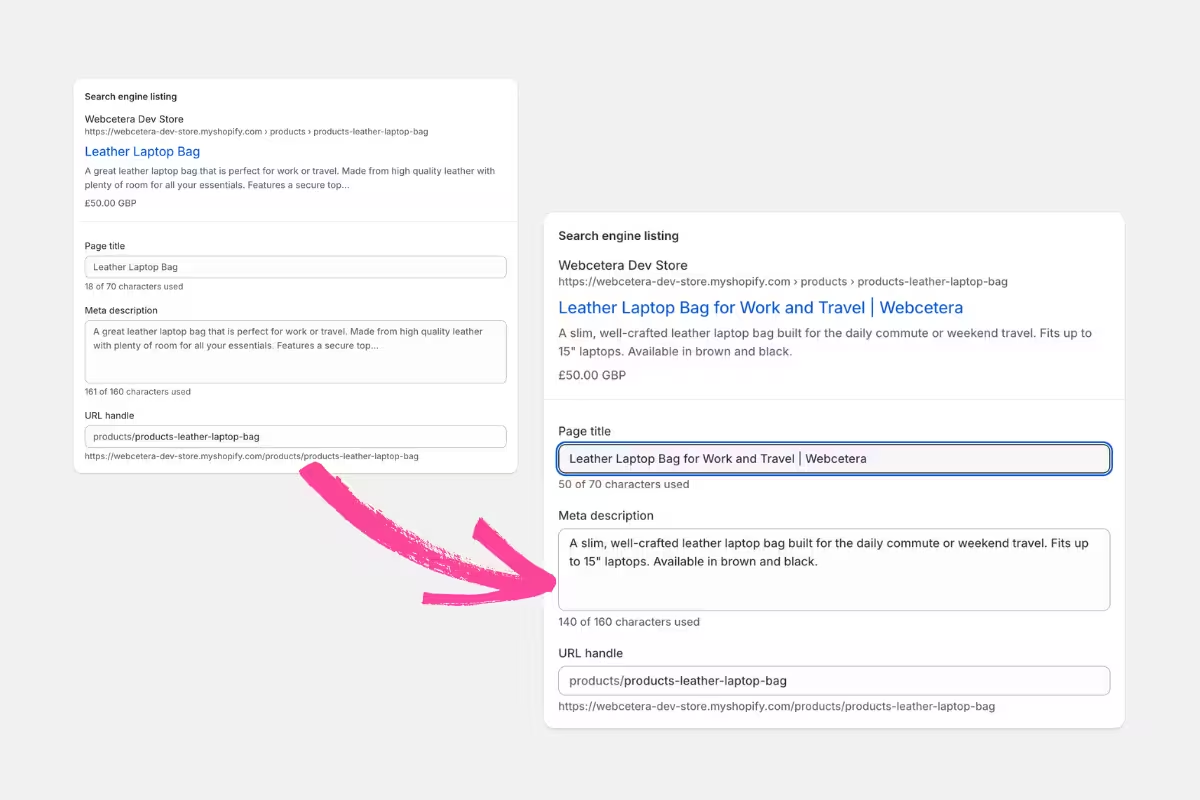
The page title is the blue linked text you see in Google search results. It tells Google what the page is about, gives searchers a reason to click and is one of the stronger ranking signals Google uses (how high your page appears in results compared to everyone else's).
The meta description is the short paragraph beneath it on the search results page. It doesn't directly affect your rankings, but it enforces the title and does affect your click-through rate (CTR); the percentage of people who see your result and actually click it.
A well-written description that explains what the page offers will pull more clicks than a vague one, even at the same position. Getting found is only half the job. Getting people to click through to your Shopify store is the other half.
Shopify provides a section to edit both the page title and meta description from the bottom of any product, collection or page. We find many store owners are unaware of these (or at least their importance) and let Shopify auto-generate them from the page content. Or perhaps they do write something, only not in an optimal way.
The result is usually meta entries that are too long, or too short. Missing the keyword, or leading with a brand name, rather than trailing with it or simply omitting it altogether. The results are generic and blend in with many other results on the search results page. Multiply that across a whole store and you've got a quiet SEO problem that nobody notices until they wonder why certain pages aren't getting clicks.
This is where, used properly, AI can help.
What is an optimised page title and meta description?
Before you write a prompt, it helps to know what you're aiming for. There are no strict rules and nothing will ‘break’, but in reality Google uses a pixel count to determine how much gets shown in the results pages (a line with a lot of M’s will display fewer characters on one line compared to a lot of I’s). Anyway, technicalities aside, here are some well-accepted tolerances:
- Page titles: 50–60 characters. Lead with the keyword, not the brand name. Don't duplicate your main H1 heading. Think "what would someone type to find this page?" and use this to compliment your main heading.
- Meta descriptions: 120–158 characters. Summarise what the page offers and why someone should click. Treat it like a micro ad. Google themselves provide a really good resource to help understand how to write a good meta description.
- Don't keyword-stuff. A title like "Leather Sofa | Buy Leather Sofas | Cheap Leather Sofas UK" will get rewritten by Google and looks terrible.
What makes a good prompt to help optimise page title and meta description?
We use Google Gemini and Claude, but the tool matters less than the brief. I’m certain that ChatGPT will be more than capable.
When you start your AI chat, rather than describing your page, give it the page. Paste in the full page content, or drop in a full-page screenshot of the page as it looks on your site (there are lots of free Chrome apps that make this easy, we use one called ‘Mobile simulator - responsive testing’). Then tell it exactly what you want.
An example prompt that works:
"Write an SEO optimised page title and meta description for this Shopify collection page. Page title: 50–60 characters, lead with the target keyword, not the brand name. Meta description: 120–158 characters, summarise what the page offers and give a reason to click. Don't keyword-stuff. A warm tone but not fussy. Here's the page: [paste content or attach screenshot]"
The "do this, to that" structure is what makes it useful. You're giving it the rules and the raw material in one go, rather than asking it to imagine a page from a description. AI will understand the page and provide you with what it thinks is best.
It goes without saying, check and tweak — AI is your assistant, not your replacement!
As mentioned, we mainly use Google's Gemini and Claude for this kind of work. Claude is exceptional for longer written content and coding (it's genuinely impressive with code), but for meta work like this, a well-trained Gemini Gem probably edges it. That might just be because ours is well set up, and Gemini ‘think’ mode (Gemini's reasoning mode, which takes a little longer but tends to produce more considered output) seems very up-to-date, but both are worth having in your toolkit.
Once you're comfortable with that, the next step is building it into a repeatable system. Both Claude and Gemini let you create a persistent project or assistant. Claude calls them Projects; Google calls them Gemini Gems. You set the instructions once: character limits, keyword placement, tone, output format. After that, you’re pretty much able to simply paste the content and get the output.
We use a Gemini Gem set up this way for a client's recipe posts on their Shopify store. When we add a new recipe, all we do is paste the raw content (it doesn't need to be polished; AI is good at working with rough material) and we get back a page title, meta description, intro text and the correct structured data values, all consistently formatted and ready to use. We now have higher quality page titles and meta descriptions, produced in half the time.
A quick aside: that structured data piece is worth a mention separately. If you're not familiar with how schema markup works alongside your meta content, we've covered it in detail in our post about structured data. If you'd like a post specifically on setting up Gemini Gems and Claude Projects for tasks like this, let us know and we'll write one.
What to check before you publish
AI gets this wrong in predictable ways, but as we all know, AI is constantly learning. The more time and effort you put in, the better the results will be:
- It goes over character limits. Count the characters or paste into a title tag checker before publishing. If you're using the SEO fields at the bottom of a product or collection page in Shopify, there's a handy preview of how your title and description will appear in Google.
- It invents specifics. If you didn't tell it your delivery threshold or return policy, don't let it write them into the meta description. Make sure your AI is focused on the main content at hand.
- It defaults to bland. If the output sounds like every other result in the search listings, push back. Ask it to be more specific or try a different angle. If you’re using a Project or Gem, over time your AI will learn the output you prefer.
- It may duplicate your H1. Read both side by side before saving. Better still instruct this in the prompt, or your Gem or Project instructions. The more information you provide, the better the results will be.
And remember, run anything AI produces through a quick sense-check. It's a first draft, not a final answer.